Web · Saas

MaxOptra Track & Trace

Bringing live location context into operations so teams could understand delivery reality at a glance and act faster, without leaving the product.

Role
UX / UI Designer
Timeline
Q2 2023 to Q1 2024
Platform
Web / SaaS
Team
PM, 2 Devs, QA
Methods
Stakeholder interviews, observation
01 The Problem

Good data. No context.

MaxOptra had timestamps, status flags, arrival times. What it lacked was location. When a stop flipped to “at risk”, operators opened a second browser tab, cross-referenced GPS data, and called there drivers.

The product already did a good job of showing delivery data in a table. But operators were jumping between the status table, raw timestamps, and external tools. Sometimes a separate GPS platform, sometimes just picking up the phone. All to piece together what was happening on the road. That context-switching was slow, error-prone, and introduced uncertainty at the exact moment when confidence mattered most.

That sequence took four minutes; it needed to take less.

“I’ve got the timestamps, but I don’t know if they’re moving or sat in traffic. I end up calling the driver just to know where they are.” Operator, stakeholder session
02 Discovery

Five findings nobody had found.

Before touching wireframes, I ran a structured discovery phase across three weeks. The goal was to understand the actual mental model of a dispatcher during a live run. Not just what they wanted to see, but when, why, and what decisions the information needed to support.

Stakeholder walkthroughs

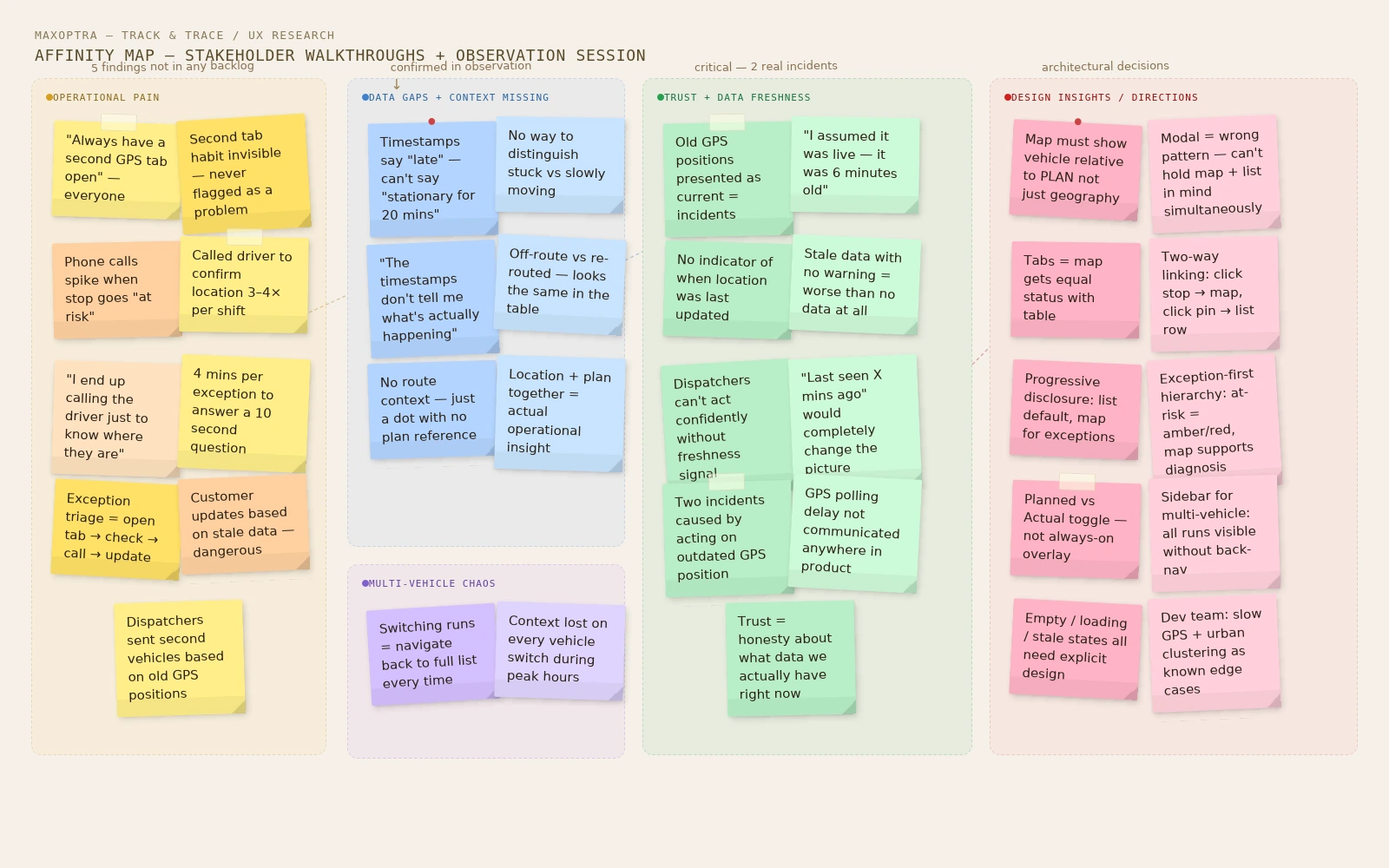
I facilitated two stakeholder walkthroughs with the product manager and two customer-facing team members. I asked participants to walk me through a real exception scenario, a late delivery, and narrate exactly what they did step by step. This surfaced five recurring pain points that weren’t in the backlog:

01

Second tab was invisible habit

Every operator had a legacy GPS tab permanently open. Nobody had flagged it as a problem.

02

Phone calls spike at “at risk”

No location data meant calling the driver. Four minutes per exception, multiple times per shift.

03

Timestamps lie by omission

“Late” and “stationary for 20 mins” look identical in the table. They demand completely different responses.

04

Multi-vehicle days break focus

Switching between runs meant navigating back to the full list each time. Constant context loss.

Observation session

I watched one dispatcher work through a live morning run. Seeing the tool in action, not just hearing about it, made the friction tangible. The moment a stop flipped to “at risk”, they opened the external GPS tab, cross-referenced the timestamp, and called the driver. Four minutes twelve seconds to answer a question the product should answer in one click.

Affinity map, research synthesis
03 Design Principles

Three rules.

From discovery, every decision ran through three clear design principles, that shaped every subsequent decision:

01
Location without context is useless
A dot on a map tells you nothing. Operators need to see the vehicle relative to the route plan and remaining stops, not just geography.
02
Stale data shown as current is worse than no data
The previous integration caused incidents where dispatchers acted on four-minute-old positions. False confidence is worse than honest uncertainty.
03
The map is for exceptions, not the default
Most of a shift is spent in the table. The map is a diagnostic tool. One click away, not in the way.
04 What I Designed

A Map that equals the table.

The output of discovery shaped a focused brief: a Map view embedded inside Track & Trace that shows the vehicle’s current position in near real-time, alongside the full route and stop context from the existing table view.

The tab architecture decision

The original concept from the product team was a “Map” button on each individual run row. Clicking it would open a modal overlay. I pushed back on this after the stakeholder walkthroughs for two reasons: the modal treated the map as an occasional pop-up rather than a peer view, and it made it impossible to reference map and list data simultaneously.

I proposed moving the map to a page-level tab, “List” and “Map” sitting side by side, giving the map view equal status with the table. This also enabled a run-selector sidebar in the map view, directly addressing the multi-vehicle pain point: dispatchers can now see all active runs at a glance and click to switch between them without returning to the list.

Alternatives considered

Three approaches were explored before settling on tabs:

Option 1
Split-screen panel
Map and list shown simultaneously. Ruled out because it gave neither view enough canvas space at 1366px.
Option 2
Inline expandable row
Map inside the table row. Ruled out because the map needed significantly more vertical space than a row could offer.
Option 3
Per-row modal (original brief)
Fragmented the experience and couldn’t handle multi-vehicle days well.

Core behaviours

Behaviour 01
Live vehicle marker with “last updated” timestamp
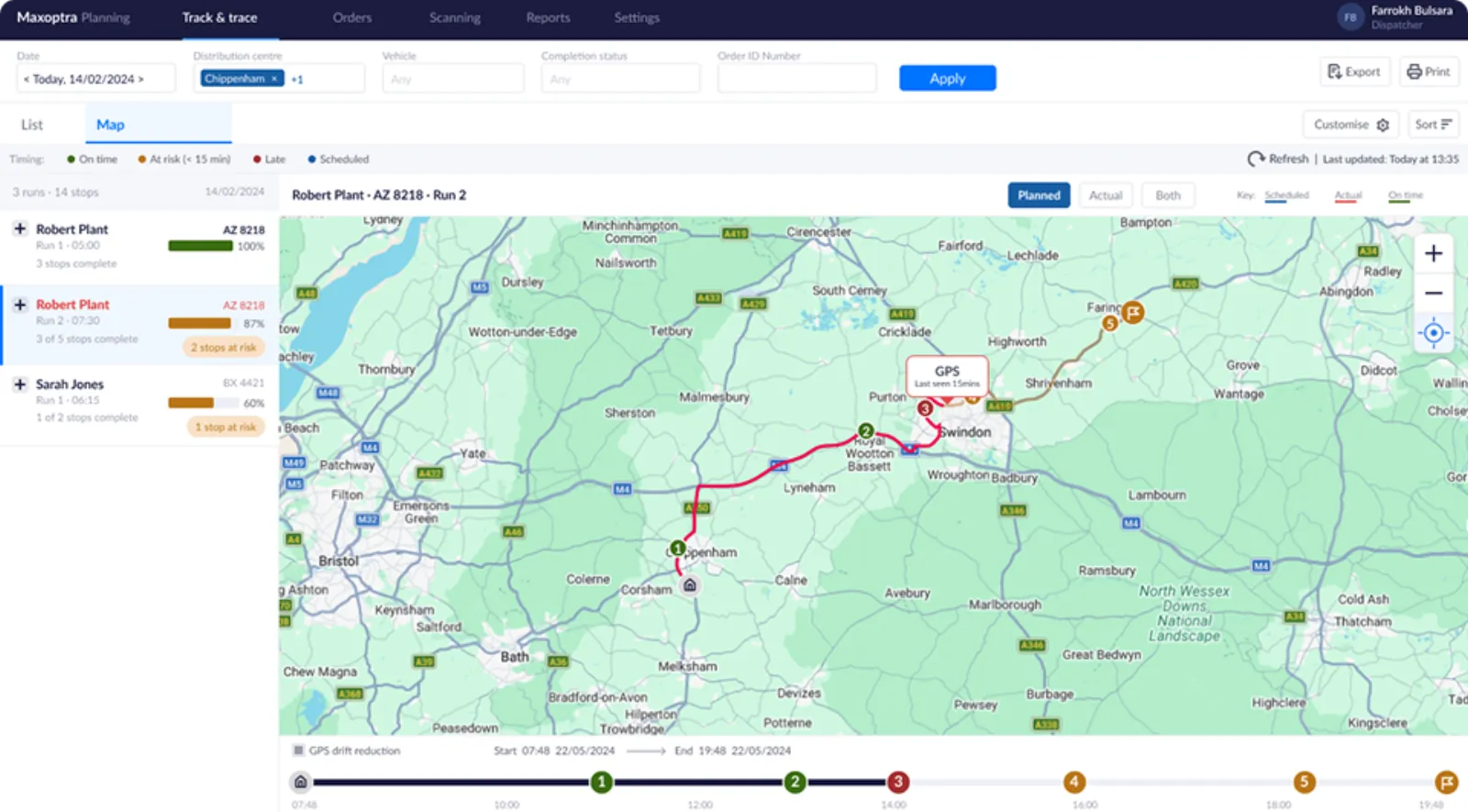
Every location display shows exactly when the data was last refreshed. If the signal is stale, the UI says so: “Last seen 4 mins ago” rather than presenting an outdated position as current.
Behaviour 02
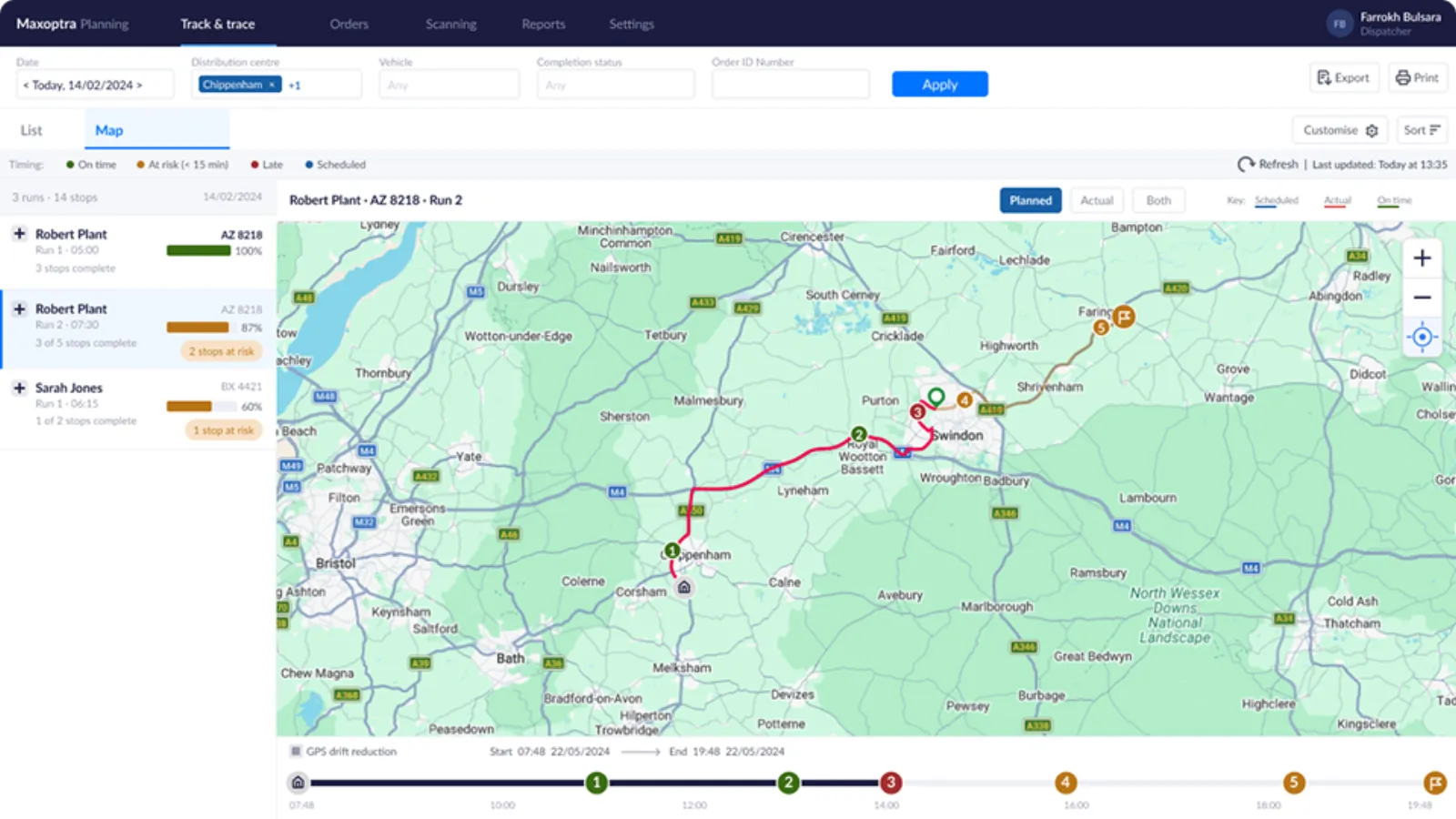
Route and stop context
The vehicle marker is always shown relative to the planned route and remaining stops. Location without context forces the same mental arithmetic the operator was doing before.
Behaviour 03
Two-way linking between map and list
Click a stop in the list, the map focuses on it. Click a stop pin on the map, the list highlights the same row. This came directly from the observation session: operators looked up a stop in the table then wanted its geographic context. Two-way linking collapses that to a single click.
Behaviour 04
Planned vs Actual route toggle
The distinction between the scheduled route and the actual GPS track was frequently confused when both lines appeared simultaneously. I redesigned this as a three-way toggle: Planned, Actual, Both. This reduces visual noise for quick location checks while keeping the comparison available for deviation investigation.
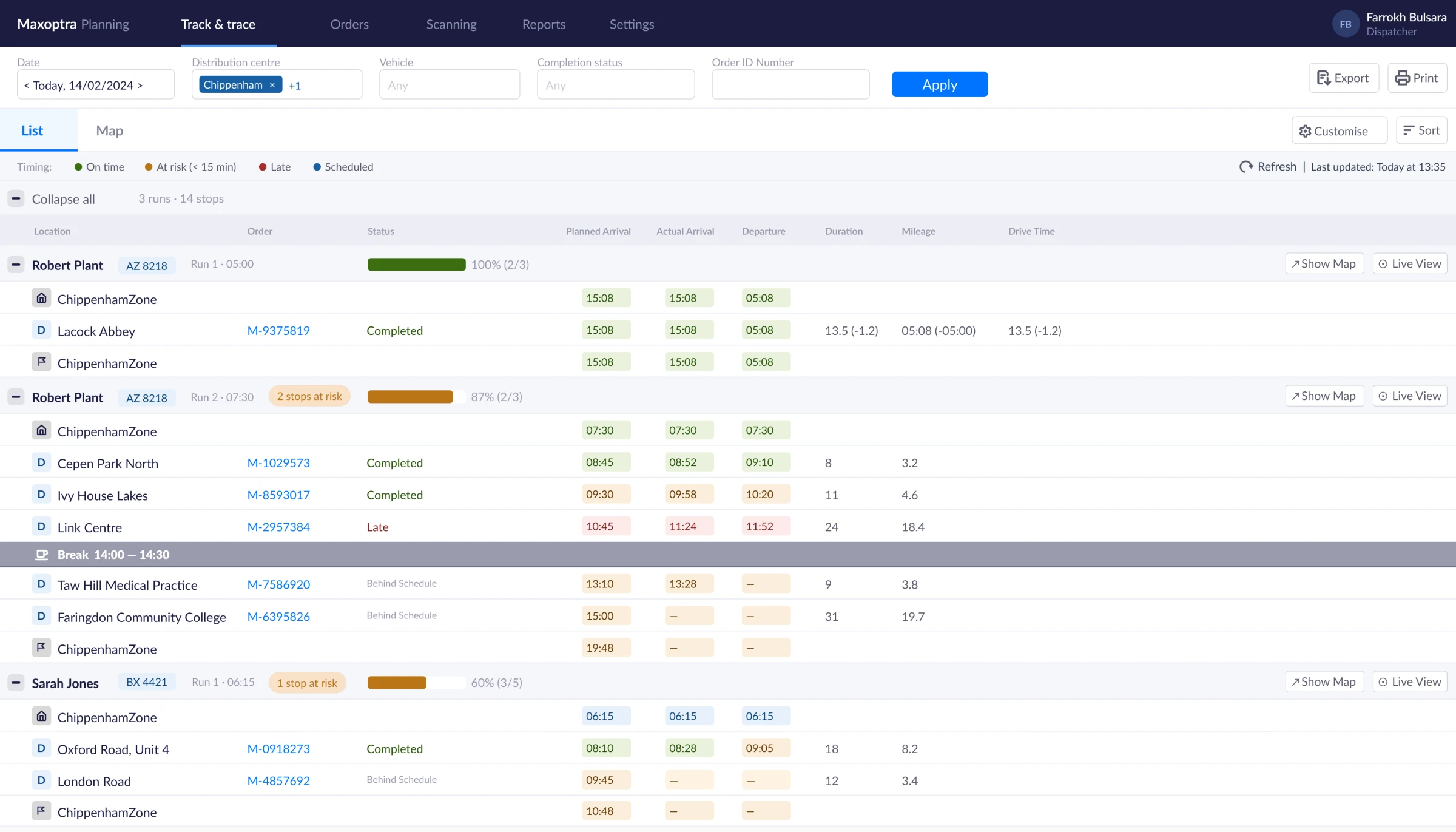
List view redesign with status, ETAs and inline timing legend
List view, redesigned table with status, ETAs and inline timings
Map view, live vehicle position with route context and stop pins
05 Key Decisions

Decisions that shaped the product.

Architecture
I rejected the modal. Tabs instead.
The brief said modal. I showed why that was wrong. A modal makes it impossible to reference map and list simultaneously. Tabs at page level gave the map equal status with the table. That single decision shaped the sidebar, multi-vehicle workflow, and everything downstream.
Trust
Every position shows its age.
Every location shows exactly when it last updated. If stale, “Last seen 4 mins ago” appears, not a current-looking marker. The previous integration caused two incidents where dispatchers acted on minutes-old data. We made data freshness non-optional.
Interaction
Map and list talk to each other.
Click a stop in the list, the map focuses on it. Click a map pin, the list highlights the same row. Operators looked up a stop in the table then wanted its geographic context. Two tabs, one mental cross-reference, several clicks. We collapsed it to one.
Visual Clarity
Planned vs Actual is a toggle, not an overlay.
Three out of four stakeholders couldn’t immediately distinguish planned from actual when both lines appeared simultaneously. Replaced with a three-way toggle: Planned, Actual, Both.
06 Before / After

Same question. Different answer.

Before

Open a second tab. Cross-reference GPS coordinates. Call the driver. Wait. Update the customer. Four minutes minimum, multiple times every shift.

After

Open the Map tab. See live vehicle position against the route plan. Click the at-risk pin. Call the customer with an accurate update. Ten seconds.

07 Edge Cases

Every edge case planned.

Edge cases weren’t brainstormed in isolation. Each one was surfaced in the stakeholder walkthroughs, the observation session, or a structured review I ran with the dev team midway through the design phase. The dev team brought three cases we hadn’t considered (slow GPS updates, off-route behaviour, urban clustering) based on known issues from the existing GPS integration.

Edge 01
No GPS / stale location
“Last seen X mins ago” state, not a masked gap. Warning banner after 10 minutes. Prioritised after past incidents caused by acting on outdated data.
Edge 02
Multiple vehicles
Sidebar lists all active runs with progress and status. Switching context is one click, not a back-navigation.
Edge 03
Slow GPS polling
Slow updates trigger stale state automatically. Threshold agreed with dev team based on GPS polling interval.
Edge 04
Off-route behaviour
Deviation shown as fact, not error. The operator decides what it means. Ad-hoc route changes are common and legitimate.
Edge 05
Dense urban areas
Clustered pins merge into count indicator at lower zoom. Known problem in existing GPS UI, designed in from the start.
Edge 06
Empty / loading / error states
All three designed as a set. Loading skeleton, permissions-missing state, no-GPS empty state.
Stale data warning state, GPS signal lost
08 How We Would Measure Success

Metrics agreed before production.

Because the project involved NDAs and live operational data, I cannot share production metrics. The following success criteria were agreed with the product manager before development began, and a measurement plan was in place for the first four weeks post-launch:

Metric 01

Time to locate

Reduced time to answer, “where is the driver?” in internal testing and user sessions.

Metric 02

Support calls

Fewer escalations related to vehicle whereabouts during live ops windows.

Metric 03

Task success

Higher success rate for exception triage: “identify why stop X is late.”

Metric 04

Adoption

Map tab used during live ops hours by >60% of dispatchers in first month.

09 What I Learned

Context is the product.

01
The gap is always context, not data.
MaxOptra had the data. The real gap between “what the data says” and “what an operator needs to act” is almost always a context problem. The work was building the right frame around information that already existed.
02
The walkthrough format surfaces what tickets don’t.
Asking people to narrate a real exception scenario step by step, rather than describe their workflow in the abstract, consistently produces more actionable insight than open-ended questions. Five pain points surfaced that had never appeared in any backlog or support ticket.
03
Pushing back on the brief was the single highest-impact decision.
The architectural choice to use tabs rather than a modal shaped the sidebar, the multi-vehicle workflow, and the ability to hold map and list in mind simultaneously. The product team agreed quickly once I showed the alternative in low-fidelity.

Specific UI details and client data are anonymised or altered due to NDA. The design process, decisions, and rationale are my own.

Try it yourself

View the prototype

Open prototype →
Available for new projects

Let's work
together

Currently taking on new briefs for design, UX, or motion.